






register for newsletter
get latest company news
+86 13113657186




Nozzle clogging is one of the biggest challenges in dtf printing. It directly affects print quality, production efficiency, and machine liFESPAn.
This article will help you understand why clogging happens and how to fix it quickly.
1. Signs of Nozzle Clogging
You may have a clogged nozzle if you notice:
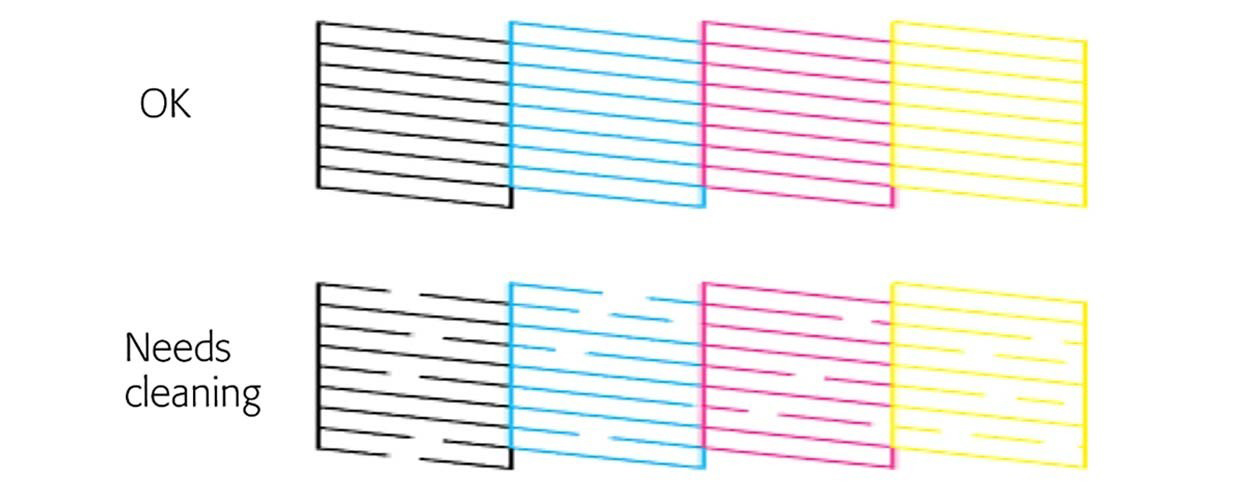
* Missing lines in prints
* Uneven colors
* Faded or blurry images
* Broken patterns in nozzle test
These problems occur because ink cannot flow smoothly through the printhead.
2. Main Reasons for Nozzle Clogging
2.1 Ink Problems
dtf ink is sensitive. Poor storage or expired ink can create particles that block nozzles.
2.2 Ink Drying
When the printer is idle, ink dries and forms a layer over the nozzle openings.
2.3 Environmental Factors
Dry air causes ink to evaporate quickly, leading to clogging.
2.4 Air in Ink Tubes
Air bubbles can interrupt ink flow and cause printing issues.
2.5 Lack of Maintenance
Skipping routine cleaning leads to ink buildup inside the printhead.
3. Effective Solutions
3.1 Automatic Cleaning
Run cleaning cycles through the printer software regularly.
3.2 Manual Cleaning
Use cleaning liquid and soft cloth to clean the printhead surface.
3.3 Check Ink System
Ensure:
* Ink is sufficient
* Tubes are not blocked
* No air inside the system
3.4 Stir White Ink
White ink must circulate properly to avoid sediment.
3.5 Replace Damaged Parts
If clogging persists, check dampers, tubes, or printhead condition.
4. Best Practices to Prevent Clogging
✔ Keep Printing Frequently
Regular use prevents ink from drying.
✔ Control Working Environment
Maintain stable temperature and humidity.
✔ Use Reliable Materials
Choose high-quality ink and compatible consumables.
✔ Daily Maintenance
* Nozzle check
* Light cleaning
* Inspect components
✔ Proper Storage
Seal ink bottles and keep them away from dust.
5. Final Thoughts
DTF nozzle clogging is unavoidable, but it can be controlled.
With proper operation, maintenance, and environment control, you can:
* improve print quality
* reduce downtime
* extend machine lifespan
Consistent care is the key to stable DTF printing performance.
dtf printer Nozzle Clogging FAQs
1. How can I prevent DTF nozzle clogging?
To prevent clogging, use high-quality ink, maintain proper humidity (40–60%), print regularly, and perform daily maintenance.
2. What is the best humidity for DTF printing?
The ideal humidity level is between 40% and 60%, which helps prevent ink from drying too quickly.
3. Should I shake DTF white ink every day?
Yes, shaking or circulating white ink daily prevents pigment sedimentation and reduces clogging risk.
4. How long can a DTF printer sit idle without clogging?
Most DTF printers can sit idle for 2–3 days, but longer periods increase the risk of clogging. Regular printing is recommended.
5. Is automatic cleaning enough to prevent clogging?
Automatic cleaning helps, but it is not enough alone. Manual maintenance and proper environment control are also important.
6. When should I replace a DTF printhead?
If repeated cleaning does not restore print quality or if nozzles remain permanently blocked, the printhead may need replacement.
get latest company news
Scan To Wechat